
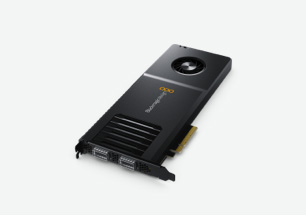
Your needs, this model
Does it fit your priorities?
Does DeckLink IP 100G accept HDMI or SDI directly?
No. The documented video input is SMPTE ST 2110 network media over two 100 Gb/s QSFP28 ports. HDMI or SDI sources need an appropriate upstream conversion/encoding path, not a guessed adapter.
Explore this need in the finder →Is the eight-channel Ultra HD ceiling identical on Mac and Windows?
No. Blackmagic’s spec footnote lists four UHD p60 capture/playback channels on Mac and eight on Windows and Linux; confirm the planned format mix, direction and workflow.
Explore this need in the finder →Does the card replace ST 2110 network commissioning?
No. It is a PCIe endpoint in a network video workflow. PTP timing, routing/discovery, compatible QSFP28 modules, stream capacity and the application must match the plant.
Explore this need in the finder →DeckLink IP 100G is a broadcast-network capture and playback board, not a conventional HDMI game-capture card. Its value depends on an existing SMPTE ST 2110 plant, a compatible PCIe workstation and someone able to configure the network media path. The name’s “100G” refers to the two 100 Gb/s QSFP28 network ports; it does not mean a USB host link or an HDMI 100-gigabit input.
Choose it when the source is already on ST 2110
Blackmagic specifies two redundant QSFP28 Ethernet connections, with up to eight channels of Ultra HD video in simultaneous capture and playback. The multirate formats run through 2160p60. The manufacturer’s platform note qualifies the 2160p60 channel count: four channels at that rate on Mac, eight on Windows and Linux. Those figures are system-level capabilities, not a promise that every codec, application and arbitrary mix of streams will run at the maximum simultaneously. Confirm the required raster, frame rate, channel direction, traffic shaping and application against the published standards and the receiving workflow before treating the upper limit as your working format.
The signal arrives over an ST 2110 network, not over BNC SDI or HDMI. This matters in a buying search: if a camera, switcher or console only presents an HDMI/SDI connector, this board is not the direct capture path. An ST 2110 source also entails network setup—clock synchronization with PTP, stream discovery/registration, multicast and NMOS management where used, and a network fabric able to carry the selected streams. The pair of QSFP28 ports provides the specified redundant connections, but redundancy is only useful when the surrounding network is designed to use it.
Budget for the workstation as carefully as the network
The host connection is PCI Express Gen 4 x8, usable in an x8 or x16 slot, with a six-pin auxiliary power connector. This is a full workstation installation, not a laptop accessory. Check the motherboard or chassis slot clearance, lane allocation, auxiliary power, cooling and operating system before buying. The network ports are video interfaces; they do not replace the internal PCIe host link. A Mac purchase needs a real supported PCIe expansion arrangement, and the board’s published Mac 2160p60 channel count is lower than the Windows/Linux figure.
The model specification names Blackmagic’s software and drivers, including Media Express and DaVinci Resolve on Mac and Windows; Linux has a narrower included-software list. Its Software Applications section also lists Open Broadcaster Software Studio (OBS) among third-party supported applications, while warning that support may vary and should be checked with the software vendor. That listing is not an OBS-specific test of the card’s maximum channel count or every ST 2110 stream layout. Verify the exact application and driver versions, selected network-video route, codec and operating system before depending on a particular workflow. The supported codec list describes possible media formats, not independent testing of every software release.
What it is not
Unlike DeckLink IP HD, which carries a smaller number of HD channels over 10GBASE-T, IP 100G uses optical QSFP28 connections and a PCIe Gen 4 x8 host. Unlike DeckLink IP/SDI HD, it has no separately described SDI BNC input path. None of the network playback outputs should be read as consumer display passthrough. This is best evaluated as a broadcast I/O endpoint inside a planned ST 2110 workflow, not as a way to add an HDMI monitor loop to a desktop capture setup.
Before ordering, confirm the exact QSFP28 modules and fiber type required by your switch or direct connection, that both redundant network paths are provisioned as intended, and that the receiving system’s PCIe slot and power supply meet the requirements. Verify the current driver, supported OS and per-channel format matrix with the project’s software vendor. The manufacturer’s current model page establishes documented capability; this review is a source-based assessment and does not claim hands-on operation or testing.
Manufacturer references: DeckLink IP 100G technical specifications and the DeckLink SDK manual.
Key specifications
Key details at a glance
| Signal input | smpte2110_ip |
|---|---|
| Confirmed capture formats | SMPTE ST 2110 SD/HD/Ultra HD through 2160p60; up to eight Ultra HD channels with a platform-specific 2160p60 limit (four on Mac, eight on Windows/Linux). |
| Confirmed passthrough formats | |
| Computer connection | Pcie |
| Named compatible software | DaVinci Resolve / Blackmagic Media Express / Open Broadcaster Software Studio (third-party supported application; support may vary) |
| HDR recording | No hdr recording mode is assigned. the specification lists ancillary hdr metadata, but the current decklink sdk table does not list rec.2020 + hdr support for this model. |
Use the exact model’s instructions for operating limits, supplied equipment and version differences.
Sources for this review
Sources for this assessment

Check your complete signal path
Choose the source format, desired captured signal, passthrough target, computer connection and software together. A single device must support that whole arrangement.