
Your needs, this model
Does it fit your priorities?
Can it capture 4K120 from an SDI source on Windows?
The model-specific format list includes UHD/4K and 4K DCI through 120 fps, and the card is an SDI capture/playback device. Treat this as a supported source standard, then confirm whether your exact source needs single-, dual- or quad-link wiring and whether your app/driver supports that mode. It is not a four-source 4K120 guarantee.
Explore this need in the finder →Does 8K60 mean I can capture four separate 8K feeds at once?
No. Blackmagic lists 8K and 8K DCI standards through 60 fps and four bidirectional Micro BNC connections, but the specification does not publish four simultaneous 8K capture streams. Multi-link connections may carry one high-resolution signal. Verify the exact link arrangement and application routing instead of multiplying port count by the format ceiling.
Explore this need in the finder →Can I connect an HDMI camera and monitor its input through this card?
Not from the documented connections. DeckLink 8K Pro Mini lists SDI Micro BNC input/output connections, not HDMI input. Its SDI outputs are playback connections and the technical page does not document a general input-to-display passthrough mode. An HDMI-to-SDI converter or separate monitor route would be additional equipment, not a feature of this card.
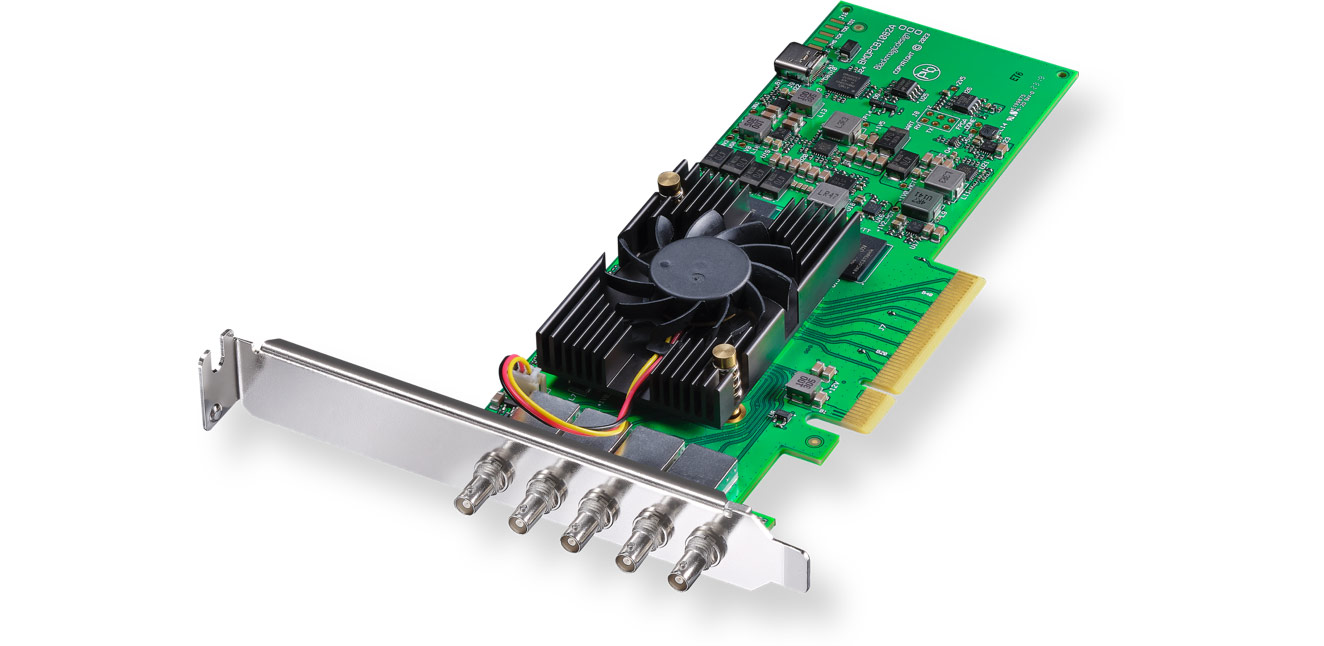
Explore this need in the finder →DeckLink 8K Pro Mini is a low-profile internal capture/playback card for a workstation with a high-bandwidth SDI path. Blackmagic lists four independent bidirectional 12G-SDI Micro BNC connectors and video standards through 8K and 8K DCI. It is not a USB device: it needs a PCI Express Gen 3 x8 host slot and supported software.
Its four Micro BNC ports are an SDI system, not four HDMI inputs
The manufacturer lists SD, HD, 2K, UHD, 4K DCI, 8K and 8K DCI standards, including 1080p120, UHD/4K through 120 fps, and 8K through 60 fps. The source and cabling must provide the selected SDI standard. Micro BNC is not full-size BNC, so check any adapters separately from signal-format support.
Independent bidirectional connectors do not establish four unrelated sources at their maximum formats at once. Multi-link SDI can use two or four connectors to carry one higher-resolution signal. Treat 4K120 and 8K60 as supported standards, then verify the source's link layout, frame rate, sampling and application routing. The format list is not a four-channel peak-throughput matrix.
Capture and output do not mean passthrough
The card is a capture and playback device, but its four connectors can be assigned as inputs or outputs. A playback output is not automatically a monitor feed that mirrors a live capture input. Blackmagic's model page does not supply a general input-to-display passthrough table, so this assessment does not promise a simultaneous 4K or 8K monitoring path. If a live display feed is essential, confirm the exact routing and timing in the intended application or add a separately documented monitoring route.
There is no HDMI input. An HDMI console, camera or computer cannot connect directly as it could to the 8K Pro G2; an HDMI-to-SDI converter would be a separate device with its own format, latency, protection, power and cabling checks. The Mini is not an analog capture card.
Host fit is part of the format decision
The 8K Pro Mini uses a low-profile PCIe Gen 3 x8 host connection and is listed as compatible with x8 and x16 PCIe slots. Its physical design and supplied low-profile slot bracket distinguish it from ordinary external USB capture products. Before selecting it, confirm that the system exposes a usable PCIe x8 link, has the correct low-profile or full-height bracket arrangement for the chassis, and can provide enough airflow and lane bandwidth alongside the other installed cards. The technical page lists 18 W power consumption, but it does not specify an external power lead in the included-items list; inspect the exact board and host requirements rather than transferring the 8K Pro G2's separate power-cable details.
Blackmagic lists Mac, Windows and Linux support and names Media Express, DaVinci Resolve and editing/broadcast applications, including OBS Studio; third-party support may vary. This is not a promise that every OS, app version, SDI link configuration and frame rate works together. Check the current driver, host requirements and app-specific mode documentation.
HDR is a separate question from the 8K headline
The specification describes 8-, 10- and 12-bit SDI sampling, Rec. 601/709/2020 color spaces, HDR static metadata, HLG and PQ transfer characteristics. It does not pair HDR recording with each capture rate in a mode-by-mode matrix. For that reason, the published color and HDR features are useful workflow clues, but they do not establish a specific 4K60 HDR, 4K120 HDR or 8K60 HDR capture mode. Nor does the card's output direction prove a same-rate input-to-monitor loop-through. Those combinations need an exact vendor or application answer.
How it differs from DeckLink 8K Pro G2
The Mini's choice is clear when a low-profile, SDI-only PCIe card is intended. The G2 adds an HDMI 2.1 mezzanine and publishes an SDK note for up to four configured streams through 4K DCI 60p; the Mini's technical section claims neither feature. The Mini's lower listed power consumption may suit a compact workstation, but the exact slot and cooling arrangement still decide whether it fits. Both list SDI standards through 8K; their HDMI and multi-stream details must not be merged.
For a USB-connected HDMI source, products such as Elgato 4K X or AVerMedia GC575 follow a very different external host path and do not substitute for SDI ingest. For a more conventional SDI workstation that only needs a 1080p60 feed, Magewell Pro Capture SDI models have different channel counts and PCIe lane requirements. Choose by the actual source connector, signal link arrangement and host—not by the largest number printed on a card family page.
Checks before choosing
Confirm the exact DeckLink 8K Pro Mini model, included low-profile bracket and compatible Gen 3 x8/x16 PCIe slot. Identify the source's single-, dual- or quad-link SDI layout, then verify resolution, frame rate, sampling, HDR and app together. The specification does not establish HDMI, analog, four independent 8K feeds or input-to-monitor looping. No installation, performance measurement, stock or customer experience is claimed.
This is a source-led assessment of the published model and its documented limits. No hardware was owned, installed or measured for this review.
Sources: Blackmagic Design's U.S. DeckLink model list and model-specific technical specifications.
Key specifications
Key details at a glance
| Signal input | Four bidirectional 12G-SDI Micro BNC connectors; single-, dual- and quad-link layouts are listed |
|---|---|
| Confirmed capture formats | Published SD/HD/2K/4K/8K and 8K DCI signal standards / 1080p through 120 fps / UHD/4K and 4K DCI through 120 fps / 8K and 8K DCI through 60 fps |
| Confirmed passthrough formats | |
| Computer connection | Low-profile pci express gen 3 x8 card, compatible with x8 and x16 slots. the technical page lists 18 w power consumption; it does not specify an external power lead in the included-items list. |
| Named compatible software | Blackmagic Media Express / DaVinci Resolve / Final Cut Pro / Adobe Premiere Pro / Avid Media Composer / Open Broadcaster Software Studio / vMix |
| HDR recording | The page lists 8/10/12-bit sampling, rec. 601/709/2020, hdr static metadata and hlg/pq transfer characteristics. it does not pair hdr recording with a specific frame-rate capture row, so no rate-specific hdr plan is assigned. |
Use the exact model’s instructions for operating limits, supplied equipment and version differences.
Sources for this review
Sources for this assessment

Check your complete signal path
Choose the source format, desired captured signal, passthrough target, computer connection and software together. A single device must support that whole arrangement.