
Your needs, this model
Does it fit your priorities?
Can the GC573 capture 4K60 HDR and keep 4K60 on the display?
AVerMedia lists 4K60 HDR recording and 4K60 HDR pass-through, with Windows/NVIDIA system floors for that capture tier. The 2025 guide names OBS and Streaming Center as recording routes; confirm your exact GPU and motherboard slot before using this internal card.
Explore this need in the finder →Is the GC573 a 4K120 or 4K144 display card?
No. Its published maximum display passthrough is 4K60 HDR; the 1440p144 and 1080p240 figures are separate lower-resolution display modes. GC575 is the AVerMedia PCIe HDMI 2.1 family member for 4K120/144 passthrough.
Explore this need in the finder →Will the GC573 work in a narrow PCIe x1 slot?
Its hardware interface is PCI-Express Gen 2 x4. The x4 slot may share bandwidth with the graphics card, so check your motherboard manual and host requirements rather than relying on physical fit alone.
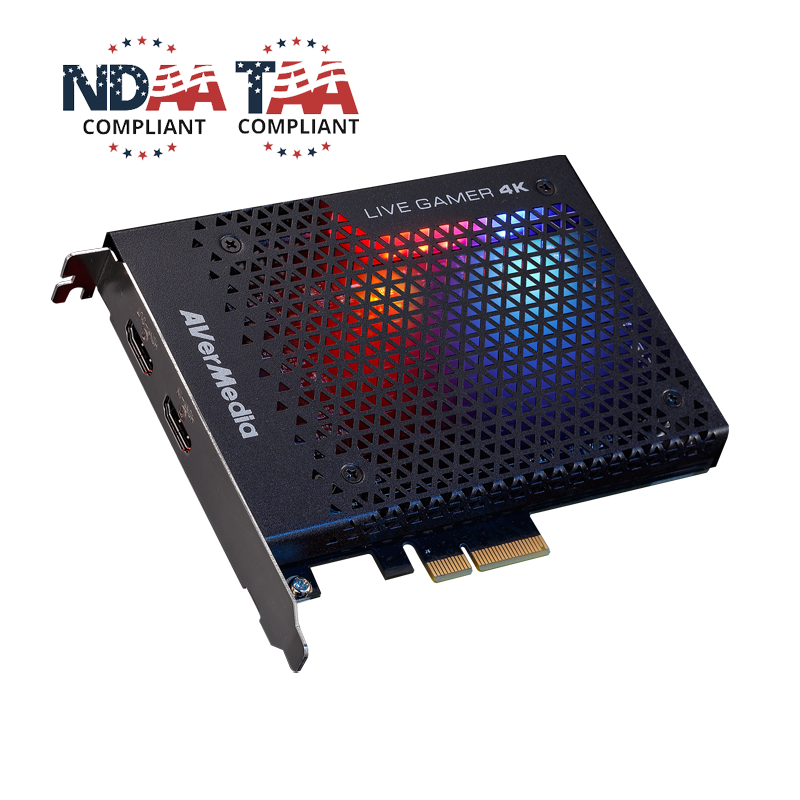
Explore this need in the finder →AVerMedia’s Live Gamer 4K GC573 is an internal HDMI 2.0 capture card for a Windows desktop, with a PCIe Gen 2 x4 interface. Its manufacturer specification lists 4K60 HDR capture and passthrough, along with 1440p144 and 1080p240 ceilings. Those high numbers do not make it an HDMI 2.1 card, and they do not prove that every capture maximum pairs with every display mode. This review uses the manufacturer’s current page and model documents; it does not report hands-on use or measured results.
Capture and passthrough are separate decisions
The current GC573 specification lists HDMI 2.0 input and output, maximum passthrough at 4K60 HDR, 1440p144 or 1080p240, and maximum recording at the same nominal tiers. It also names YUY2, NV12, RGB24 and P010/HDR formats and says recording can use Streaming Center or OBS. Protected HDCP signals cannot be viewed, recorded or streamed. That gives a clearer baseline than a bare marketing headline, but the exact source-to-capture pair still matters.
AVerMedia’s current host requirements identify a Windows x64 system and give separate computer floors for the 4K60 HDR/1080p240 tier and the 1080p60 tier; the higher capture tier requires a specified NVIDIA GPU in the listed setup. The page specifically notes that 4K60 HDR passthrough is supported in those requirements. A 2025 quick guide names OBS and Streaming Center, but lists 1440p120 capture where the current product page lists 1440p144. I retain the current page’s value as a provisional ceiling and record the discrepancy rather than silently averaging the two sources. If 1440p144 is essential, confirm the exact supported app, driver and input mode with the latest AVerMedia documentation.
Who should compare it
The GC573 makes sense to investigate for a Windows gaming desktop that already has a usable PCIe x4 slot and needs an HDMI 2.0 capture path up to 4K60 HDR. It is a potentially more modest option than AVerMedia’s HDMI 2.1 GC575 when the display does not require 4K120 or 4K144 passthrough. It is also different from the GC571: the GC571 uses a Gen 3 x1 slot, captures up to 4K30 and passes 4K60 to a display. The GC573’s HDMI 2.0 ceiling and more demanding x4 host connection are central tradeoffs, not incidental details.
The current product page says 4K/HDR/high-frame-rate capture requires an NVIDIA graphics card and lists processor and memory floors. It also warns about PCIe slot bandwidth sharing with the graphics slot. Before buying, check the motherboard manual for the actual electrical lane allocation and whether the slot remains active alongside the GPU. A physically long connector is not by itself proof that the system meets the required connection or bandwidth.
Audio, apps and protected sources
The technical page documents HDMI 2.0 audio input/output and 5.1/7.1-channel LPCM passthrough. That is not the same as proving multichannel recording in every application or setup. AVerMedia names OBS and Streaming Center for recording, but app versions, audio devices and host requirements can affect the available workflow. Its support/download index remains model-specific; consult it for current drivers rather than relying on an old package key or a historic software bundle. The older datasheet includes a PowerDirector key reference, but the manufacturer states that its distribution ended in 2025, so it should not be treated as a current included license.
Like other HDMI capture devices, the GC573 is not for recording copy-protected HDCP content. Check whether the source can output an unprotected signal before selecting capture hardware. Also plan the audio route separately if commentary, a headset or console party chat is important; the published HDMI audio specification does not establish a separate analog microphone input.
Practical decision summary
Consider the GC573 when a desktop PCIe installation, Windows software path and HDMI 2.0 limits match the setup. The most consequential purchase checks are the exact PCIe lane requirement, GPU/system tier, capture mode, display passthrough combination, source protection state and app. If the need is 4K60 HDR, the current page supports that target; if it is 4K120/144 display passthrough, compare the GC575 or another HDMI 2.1 card instead. If the need is a compact x1 installation and 4K30 capture is adequate, review the GC571 separately.
The US manufacturer listing identifies GC573 as a distinct product, but this research does not verify current third-party stock, retail price, warranty eligibility, latency or image quality. Confirm the exact SKU and package with the seller and review AVerMedia’s current host and software guidance. This is a source-based compatibility assessment, not a personal-use report.
Key specifications
Key details at a glance
| Signal input | hdmi_2_0_unencrypted |
|---|---|
| HDMI generation | HDMI 2.0 |
| Confirmed capture formats | 4K60 HDR (NVIDIA GPU required for 4K/HDR capture) / 1440p144 / 1080p240 / lower supported 1080p modes |
| Confirmed passthrough formats | 4K60 HDR / 1440p144 / 1080p240 |
| Computer connection | Pcie |
| Named compatible software | OBS Studio / AVerMedia Streaming Center (Windows) / AVerMedia RECentral (legacy/current support listing) / AVerMedia Assist Central Pro |
| HDR recording | The current product page lists 4k60 hdr capture; hdr/p010 capture and obs/streaming center support are also stated in the 2025 quick guide. high-resolution, hdr and high-frame capture require an nvidia graphics card per the current product page. |
| Analog audio input | Hdmi 2.0 audio input and hdmi 2.0 pass-through. no separate analog microphone/line input is listed. |
Use the exact model’s instructions for operating limits, supplied equipment and version differences.
Sources for this review
Sources for this assessment
- AVerMedia US GC573 Live Gamer 4K listing; exact product and Shopify variant SKU GC573
- AVerMedia Live Gamer 4K GC573 technical specification, mode maxima and Windows system requirements
- AVerMedia GC573 English datasheet (2024), interface, HDMI, dimensions and historical package entry
- AVerMedia GC573 Quick Guide (2025), PCIe installation, capture software, HDR and mode ceilings
- AVerMedia current GC573 support/download index; model-specific 2026 driver and software updates
- Official US GC573 product image from the exact US product listing

Check your complete signal path
Choose the source format, desired captured signal, passthrough target, computer connection and software together. A single device must support that whole arrangement.