
Your needs, this model
Does it fit your priorities?
Does the GC515 accept an HDMI source into the capture device?
No HDMI input is established. AVerMedia identifies USB-C DP Alt Mode as the video-source connection and HDMI 2.0 as the display pass-through output; an HDMI-out-only source is not shown as a supported GC515 input. Check the exact source port and adapter path rather than assuming the HDMI socket is an input.
Explore this need in the finder →Can GC515 record 1080p60 while a DP 1.4 source passes through at 4K60?
That is the specific simultaneous arrangement AVerMedia documents: 4K60 pass-through is possible from a DP 1.4 source, and recording is capped at 1080p60 in that case. The capture side is not 4K60. The Windows OBS assessment additionally requires OBS 30.2 or later and AVerMedia HyperDecoder; verify source DP support, host, cable and selected setup.
Explore this need in the finder →Can GC515 record 4K60 while keeping a 4K60 display signal?
No. The manufacturer's recording maximum is 4K30, and its 4K60 pass-through footnote caps simultaneous recording at 1080p60. Do not combine separate capture and display maxima into a 4K60-recording claim. The exact 4K60 display arrangement also requires a DP 1.4 source.
Explore this need in the finder →Does the manufacturer document GC515 with OBS on a Mac?
AVerMedia lists macOS system requirements and its manual/FAQ names an OBS setup on macOS. The reviewed sources do not provide a full Mac resolution/codec table or the streaming-host USB data rate, so the Mac/OBS result is a platform/software assessment, not a promise that any listed Windows mode transfers to Mac.
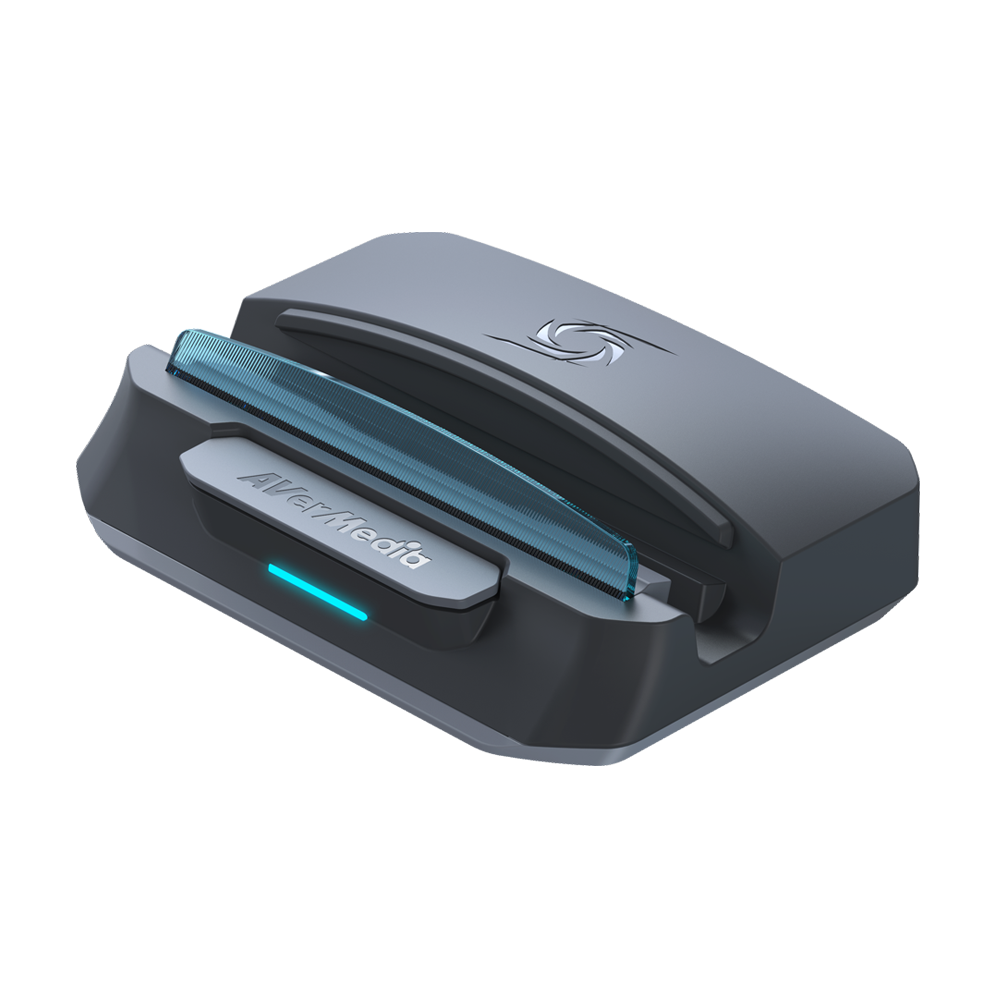
Explore this need in the finder →The AVerMedia X’TRA GO GC515 is a capture dock rather than a conventional HDMI-to-USB box. Its video source connects through USB-C DisplayPort Alt Mode; the HDMI 2.0 socket is the display output. That distinction is decisive. It can fit a handheld, phone, tablet or other source that sends video over USB-C DP Alt Mode, but the reviewed specification does not establish an HDMI input for a console with only HDMI out. This is a source-based assessment of the exact U.S. listing, not hands-on testing.
One dock, three different signal paths
GC515 combines a stand/dock, power delivery, USB peripherals, video output and capture. The manual labels separate USB-C connections for the handheld or PC, PD charging and a streaming PC; it also shows two USB-A Gen 1 ports for peripherals, an HDMI output, a microSD slot, a mode switch and a 3.5 mm headphone jack. The included HDMI 2.0 cable is for the display route, not evidence that a source can enter through HDMI. AVerMedia lists a USB-C-to-A host cable and a USB-C-to-C PD/source cable in the box. The source cable is specified as DP 1.4/10 Gbps; that figure describes the supplied source-side cable, not the data rate of the separate streaming-PC connection, which the model documents reviewed here do not establish.
This arrangement makes the GC515 notably different from a small card such as the GC313Pro. Both are USB-C DP Alt Mode docks with an HDMI display output, but GC515's listed capture ceiling is higher and it records to microSD without a computer. The GC313Pro is listed at 1080p60 capture; GC515's separate maxima are 2160p30, 1440p60 and 1080p120. Those are model-format ceilings, not a promise that every capture mode coexists with every display mode.
Do not combine the headline maxima
AVerMedia lists pass-through up to 2160p60 or 1080p120, and recording up to 2160p30, 1440p60 or 1080p120. The important simultaneous-use footnote says that when the display path is 2160p60, recording is capped at 1080p60. In other words, 4K60 passthrough is not 4K60 capture. The product specification says a DP 1.4 source supports up to 4K60 passthrough, whereas DP 1.2 supports up to 4K30. Check the source device's DP Alt Mode generation and the monitor path before treating 4K60 as available. AVerMedia's PC-free FAQ also gives a 4K30-to-1080p60 distinction for a 4K60 signal, but calls that source HDMI even though the product specification and manual identify USB-C DP Alt Mode as the video input and HDMI as output. I do not treat that FAQ wording as proof of an HDMI input.
There is no positive HDR-capture or HDR-passthrough claim in the model specifications and manuals reviewed for this assessment, so HDR should not be inferred from the HDMI 2.0 port or resolution figures. AVerMedia explicitly says HDCP-protected signals cannot be viewed, recorded or streamed. For a protected streaming-service signal, this is the wrong path.
Standalone recording needs a card and a mode check
PC-free recording is the GC515's most distinctive practical feature: switch to capture mode, insert microSD and use the hardware control to start recording. The card is not included. The specification allows up to 1 TB in exFAT and recommends U3/V30; AVerMedia's support FAQ is more exact, calling for microSDXC UHS-I U3, A2, V30 or higher. The FAQ says only the first partition is recognized and that a recording is split into hourly files. A fragmented MP4 recording may need to be remuxed for easier seeking or editing. The switch also changes the unit to card-reader mode, so check the position before assuming the PC will see a capture device.
The headphone jack is an audio output/monitoring connection, not a microphone input. AVerMedia's manual names the two USB-A sockets for peripherals such as a microphone, but that does not make the 3.5 mm port a mic or line-in for the captured signal. Anyone relying on party-chat capture should confirm the console, headset and chat-audio route separately rather than expecting the GC515 to mix a microphone through its headphone socket.
Computer software and the less settled details
AVerMedia lists Windows 10/11, macOS 13/14 or later and iPadOS 17 or later (USB-C) in the system requirements, but the evidence is not equally specific for each platform. The Windows manual describes AVerMedia Center settings and AVerMedia HyperDecoder for OBS Studio 30.2 or later. Its Mac section also documents AVerMedia Center settings and an OBS 30.2-or-later workflow; AVerMedia's setup FAQ says to match OBS's resolution and frame rate to the signal source. The sources reviewed here do not provide a complete per-mode Mac table or a confirmed streaming-PC USB data generation. The listed iPadOS requirement does not name a capture app and mode combination, so it should not be read as a complete iPad recording promise.
The unit weighs 176 g and measures 141 × 99.4 × 37.7 mm. The spec lists up to 65 W power delivery, while the manual recommends using the handheld's own power adapter when charging. An appropriate charger is not among the listed box contents. These details make the GC515 a potentially useful travel dock, but also mean it takes more desk or bag space than a capture-only dongle.
Who should consider it
GC515 is worth investigating when the source has USB-C DP Alt Mode, a dock and charging hub are useful, and the capture target is 4K30, 1440p60 or 1080p120 in an individually supported setup—or when direct microSD recording matters more than a desktop workflow. It is a poor fit for an HDMI-only source, a 4K60 recording requirement, protected video, or a buyer who needs a confirmed USB host rate or a 3.5 mm microphone input. Verify the exact source, DP generation, pass-through/capture pairing, card format, host connection and seller package before ordering. The exact U.S. model assessed is SKU 61GC515000AS; the listing and cited manuals do not establish the current condition or compatibility of any third-party offer.
Sources: AVerMedia's GC515 model specifications and support page, the GC515 user manual, the quick-start guide, the datasheet, the PC-free recording FAQ and AVerMedia's software-configuration FAQ.
Key specifications
Key details at a glance
| Signal input | USB-C DP Alt Mode (video source input; not HDMI) |
|---|---|
| Confirmed capture formats | 4K30 / 1440p60 / 1080p120 / 1080p60 (when 4K60 is passed through to the display) |
| Confirmed passthrough formats | 4K60 (DP 1.4 source) / 1080p120 |
| Computer connection | USB-C to streaming PC; data rate not stated |
| Named compatible software | AVerMedia Streaming Center on Windows / AVerMedia Center 1.0.24 settings utility on Windows and macOS / OBS Studio 30.2 or later; Windows manual identifies AVerMedia HyperDecoder, and the Mac manual/FAQ document OBS setup |
| HDR recording | Not established in the reviewed gc515 specifications/manuals; no hdr-recording claim is assigned. |
| Analog audio input | No 3.5 mm analog line-in |
| Cables listed in the box | HDMI 2.0 cable / USB Type-C to Type-A cable listed for a PC/notebook connection / USB Type-C-to-Type-C DP 1.4/10 Gbps cable for the video-source connection (manual wording; not the streaming-host data-rate claim) |
Use the exact model’s instructions for operating limits, supplied equipment and version differences.
Sources for this review
Sources for this assessment
- AVerMedia US X'TRA GO GC515 listing and SKU
- AVerMedia X'TRA GO GC515 model specifications and support
- AVerMedia GC515 User Guide
- AVerMedia GC515 Quick Start Guide
- AVerMedia GC515 Datasheet
- AVerMedia GC515 PC-free recording FAQ
- AVerMedia GC515 software configuration FAQ
- AVerMedia GO Series feature and compatibility page
Check your complete signal path
Choose the source format, desired captured signal, passthrough target, computer connection and software together. A single device must support that whole arrangement.