
Your needs, this model
Does it fit your priorities?
Does the BO311 capture card record 4K60?
No 4K capture is documented for the BO311. Its bundle uses the original GC311, whose datasheet lists HDMI 1.4 input and maximum recording and display passthrough of 1080p60. Do not borrow the separate GC311G2's 4K60 HDR passthrough claim; the two are different host and HDMI generations.
Explore this need in the finder →What is included in the BO311, and is it only a capture card?
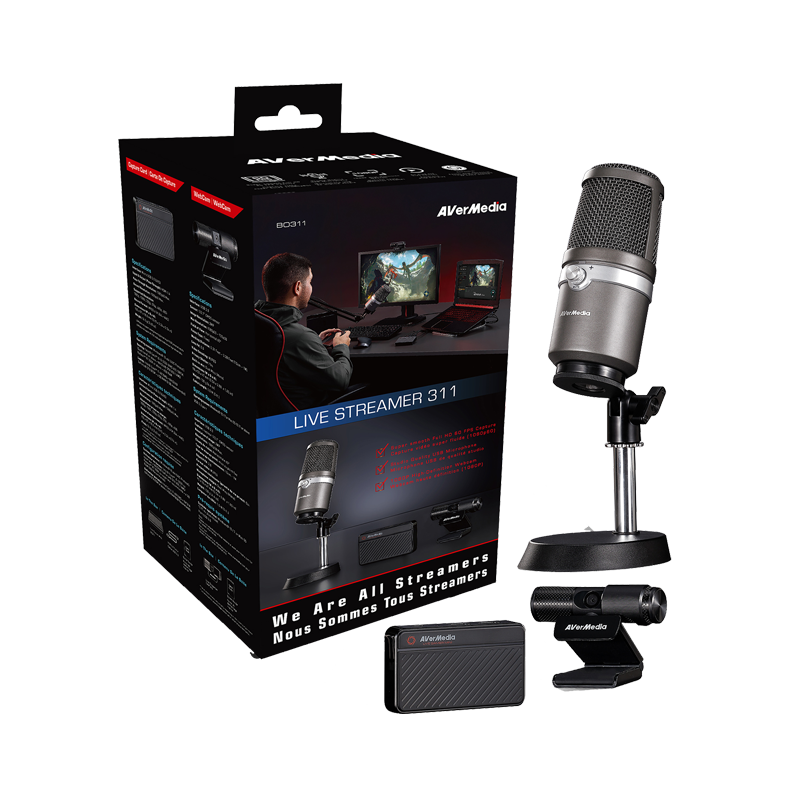
AVerMedia's US BO311 listing names the GC311 capture unit, PW313 webcam and AM310 USB microphone. A separate US listing identifies Live Streamer Duo (BO311D), and its product-image labels identify GC311 and PW313; the reviewed BO311D page does not set out a full box inventory. Do not assume its microphone contents match BO311. Verify the exact package SKU, named components, accessories and seller photos before treating either kit as a card-only offer.
Explore this need in the finder →Is the BO311 a sensible Windows 11 OBS setup?
AVerMedia publishes an OBS setup for the GC311 and PW313 on Windows, but also warns that its old StreamEngine plugin is unpublished and can cause Streaming Center and OBS problems on Windows 11 24H2. Do not treat StreamEngine as a required current step; check the exact OS, app, firmware and seller return terms before relying on an older kit.
Explore this need in the finder →Does the BO311D include the AM310 microphone?
The US manufacturer page identifies BO311D as Live Streamer Duo and labels the GC311 capture unit and PW313 webcam in its product images, but the reviewed page does not provide a detailed box inventory. BO311 is separately documented as a three-item package with AM310; do not transfer that inclusion to BO311D. Confirm the exact BO311D contents with the offer seller.
Explore this need in the finder →The AVerMedia Live Streamer 311 (BO311) is a complete streaming kit, not a card-only product. Its package combines the original Live Gamer MINI capture unit (GC311), the Live Streamer CAM 313 webcam (PW313), and the AM310 USB microphone. AVerMedia's US listing identifies the exact package SKU as BO311; the manufacturer technical page and datasheet distinguish the three components. The US product page showed the package as sold out when checked on 2026-10-30, which does not establish what a third-party seller has now or the condition of a used offer.
A separate US manufacturer listing identifies a distinct Live Streamer Duo (BO311D) SKU. Its product-page image labels identify the same GC311 capture unit and PW313 webcam, so this review also covers that shared capture path as a package variant. The BO311D page reviewed here does not provide a detailed box inventory; do not assume that the AM310 microphone from the BO311 package is included. Check the exact BO311D offer, included components and seller photographs separately.
First identify the card inside the kit
The capture unit is the original GC311, not the later GC311G2 StreamLine MINI+. That distinction changes both the computer link and the video path. BO311's GC311 is specified for HDMI 1.4 and Micro USB 2.0 UVC; its maximum recording and display passthrough formats are both 1080p60. The newer GC311G2 instead documents HDMI 2.0 and a USB 3.0 host link, with 1080p60 capture alongside higher-resolution or higher-refresh passthrough modes. Do not use a search result that says only “Live Gamer MINI” to transfer those newer specifications to BO311.
For the original GC311 in BO311, the datasheet's connection diagram shows an HDMI source entering at 1080p60, HDMI output continuing to a display at 1080p60, and USB 2.0 sending video to the PC. This is a useful simple console-to-monitor-to-computer path when Full HD at 60 frames per second is enough. It is not a 4K recording option, and the HDMI 1.4 connection does not promise HDR or high-refresh passthrough. AVerMedia's GC311 datasheet also excludes HDCP-protected video; protected streaming-video sources should not be treated as capturable.
The USB 2.0 link is a real boundary
USB 2.0 is not merely the connector shape. The manufacturer calls out a Micro USB 2.0 UVC capture connection, so this package does not meet a requirement for an external USB 3.0-or-faster card. The box specification lists a USB cable with the capture unit, but it does not turn the host path into USB 3.0. If your workflow depends on a specific USB generation, avoid assuming that an adapter, hub, or cable can raise the device's native link capability.
The separately included PW313 webcam and AM310 microphone may make the kit practical for someone assembling a basic desk setup from scratch. AVerMedia's package page names the three units, and the datasheet lists component accessories and separate USB connections. But bundled extras are only useful if they fit the actual setup: a buyer who already owns a camera and microphone may prefer a card-only model rather than paying for duplicative peripherals. This is one reason to assess BO311 as a kit instead of describing it as interchangeable with a GC311-only purchase.
OBS is documented for Windows, with a legacy-software caveat
AVerMedia publishes a Windows OBS setup that adds GC311 and PW313 as video sources and describes audio-device selection and monitoring. That provides a named Windows/OBS path for the capture components. The BO311 specification page gives an older Windows 10 requirement for GC311; check the current operating-system, driver and app notes for the computer you will actually use rather than treating a 2019 system-requirement floor as a modern compatibility guarantee.
There is an important software distinction. AVerMedia's support notice says its StreamEngine plugin can cause Streaming Center and OBS to malfunction on Windows 11 24H2, and says StreamEngine is unpublished and will not receive further updates. GC311 is among the named models. That is a warning about the legacy plugin combination, not evidence that every direct UVC capture path fails. Do not rely on StreamEngine as a necessary step; check whether it is installed and follow the manufacturer's current support guidance before planning a Windows 11 workflow.
The BO311 page's dated Mac OS X requirement does not provide a current Mac app and mode matrix, so this assessment does not recommend a Mac/OBS configuration by analogy. The kit's webcam and microphone have their own component specifications and software paths; their presence does not prove that every video, audio or control feature is available in every operating system.
Who should compare BO311—and who should not?
This earlier kit is relevant to someone who specifically wants the named webcam and USB microphone together with a basic HDMI capture path, accepts the original USB 2.0 GC311, and can verify a complete, correctly identified package. It is not a fit for 4K recording, HDR recording, USB 3.0-or-faster capture, or a high-refresh display chain. It also should not be confused with current GC311G2 hardware, whose passthrough figures are materially different.
Before considering any offer, verify the BO311 SKU and the GC311, PW313, and AM310 components; check that the seller's photos and box contents correspond to this kit; and review the return policy, condition, cable set and applicable warranty directly with the seller. AVerMedia's US listing was sold out at the time of research, so this review does not imply that BO311 is available, recommend a price, or promise support for a particular used unit. This assessment is based on manufacturer product and support materials, not hands-on use or performance testing.
Sources: AVerMedia US BO311 listing, the BO311 technical page, the BO311 datasheet, AVerMedia's GC311/PW313 Windows OBS setup, and its StreamEngine compatibility notice.
Key specifications
Key details at a glance
| Signal input | hdmi_1_4_unencrypted |
|---|---|
| HDMI generation | 1.4 |
| Confirmed capture formats | 1080p60 maximum; lower 1080p, 1080i, 720p, 576p and 480p source formats are listed |
| Confirmed passthrough formats | 1080p60 maximum |
| Computer connection | Usb 2 |
| Named compatible software | OBS Studio (manufacturer setup for GC311 and PW313 on Windows) / AVerMedia StreamEngine (legacy plugin; manufacturer says it is unpublished and no longer updated) |
| HDR recording | No hdr recording mode is documented; the gc311 datasheet explicitly excludes hdr and high-refresh formats. |
Use the exact model’s instructions for operating limits, supplied equipment and version differences.
Sources for this review
Sources for this assessment
- Live Streamer 311 BO311 — AVerMedia US listing and package SKU
- Live Streamer 311 BO311 — manufacturer component specifications
- BO311 datasheet — component package, signal path and requirements
- GC311 and PW313 Windows setup in OBS Studio
- AVerMedia warning for legacy StreamEngine on Windows 11 24H2
- BO311 kit image from the exact AVerMedia US listing
- AVerMedia US Live Streamer Duo BO311D listing

Check your complete signal path
Choose the source format, desired captured signal, passthrough target, computer connection and software together. A single device must support that whole arrangement.