
Your needs, this model
Does it fit your priorities?
Can KONA X capture 4K60 from HDMI as well as SDI?
AJA lists 4K DCI/UHD through 60p over both SDI and HDMI 2.0. The detailed mode table limits 4K60 to 10-bit YCbCr 4:2:2; 12-bit RGB 4:4:4 goes to 30p. The Windows AJA Control Room plans here cover one source at a time and require checking the source timing, app, storage and current KONA X driver.
Explore this need in the finder →Does the HDMI output pass through an HDMI source to a display?
The product page describes one HDMI input and one separate HDMI output, but says the HDMI output can monitor a single SDI source. AJA separately documents simultaneous SDI input-to-SDI monitoring. I found no primary documentation for direct HDMI-input-to-HDMI-output passthrough, so do not choose KONA X for that exact connection without confirming the full route.
Explore this need in the finder →Can I put KONA X in a Thunderbolt chassis instead of a PCIe workstation?
AJA's v18 manual permits a Thunderbolt 3 or 4 PCIe expansion chassis for a host without PCIe slots, but says that chassis must provide ATX connectivity and adequate power. KONA X remains a PCIe card, and the product specification and manual differ about slot-versus-auxiliary power; verify the exact enclosure and board before ordering.
Explore this need in the finder →The AJA KONA X is a workstation video I/O board for an SDI or HDMI production chain. AJA documents 12G-SDI, HDMI 2.0, 4K/UltraHD through 60p, Control Room capture and professional monitoring. It is not a USB streamer. This documentary assessment is not a hands-on test.
Separate inputs, outputs and monitoring routes
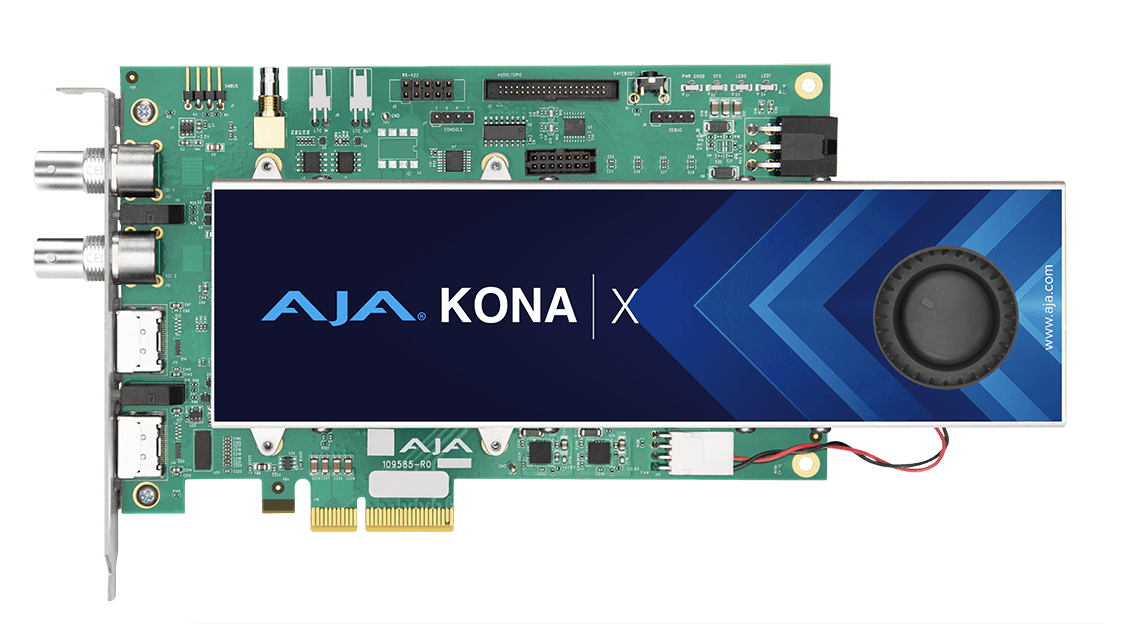
The connector names matter. The card has two full-size bidirectional 12G-SDI BNCs; AJA's detailed I/O section describes one SDI capture channel with simultaneous SDI pass-through monitoring and a separate SDI output. There is also one full-size HDMI 2.0 input and a distinct full-size HDMI 2.0 output. AJA says the HDMI output can monitor an SDI source. The reviewed documents do not describe a direct HDMI-input-to-HDMI-output passthrough route, so the pair of HDMI sockets should not be treated like a consumer gaming card's automatic HDMI loop-through.
AJA's sheet separately claims two-channel 4Kp60 capture or playback; Windows v18 notes describe a different four-channel mode of two 1080p60 captures plus two 1080p60 playout streams. Those are distinct limits, not proof of one four-channel 4K session. The finder assessment uses one source at a time.
4K60 depends on signal format, not just the port label
AJA lists DCI 4K, UltraHD, 2K, HD and SD through 60p over SDI and HDMI. Its format table supports 10-bit YCbCr 4:2:2 through 60p, but 12-bit RGB 4:4:4 only through 30p. Confirm the raster, frame rate, color space, transport and app setting; “4K60” alone does not specify them.
The manual describes Control Room for capture, playback and output; Windows v18 notes list OBS Studio 27.2.x, 28.1.x, 29.1.3 and 30, while noting KONA X issues with 29.1.3 and 30. Check the exact driver/plugin, OBS release and format rather than assuming version-independent support.
Host power and chassis fit need a real check
KONA X is a PCIe Gen 3 x4 board. The v18 manual permits a Thunderbolt 3 or 4 PCIe expansion chassis if it supplies ATX connectivity and adequate power. This is not a bus-powered Thunderbolt dongle: check the slot, lane allocation, enclosure, data path, storage and cooling.
Power documentation conflicts: the manual says ATX power is required, while the current specification allows PCIe-slot or 6-pin auxiliary power. Verify the offered board revision and current installation guidance; do not infer its power path from the slot alone.
Cooling, breakouts and package contents are configuration details
The AJA image here shows the fan-cooled card. AJA also mentions a fanless version, but current NTV2 documentation calls passive cooling an OEM configuration being planned. Its exact retail identity and availability remain unclear; check card dimensions and airflow, since this image does not show what a seller will ship.
The manual lists the PCIe card as the base shipment; optional KONA Xpand or customer-supplied breakouts may be needed for AES/EBU, analog audio, reference, LTC and RS-422. Embedded SDI/HDMI audio is separate. Confirm Xpand, harnesses and cables in the exact offer.
HDR and low-latency language need qualification
The v18 Control Panel manual says HDR Capture settings affect metadata saved with captured video; the specification lists SDI VPID and HDMI HDR10/HLG signaling. Actual recording still depends on source, transfer characteristics, format, app and file workflow. This assessment assigns Windows Control Room HDR cases only at 1080p60 and 4K60—not OBS, every codec or every multi-channel route.
The KONA X page and manual describe GPUDirect RDMA or Streaming DMA features, but AJA's current NTV2 device reference says KONA X firmware does not support the newer “streamingdma” feature and points to KONA XM. Those documents may describe different API or firmware contexts. I do not make a latency or developer-DMA performance promise here; confirm the current firmware, SDK and application stack for such a requirement.
Who should consider it
KONA X is worth investigating for a production workstation needing one documented SDI or HDMI 2.0 source at 4K60 10-bit 4:2:2, with a verified PCIe power path. SDI monitoring and HDMI output can serve production workflows, but the sources do not establish direct HDMI-input-to-HDMI-output passthrough. AJA's product references do not establish a universal standalone retail SKU or seller package.
Before ordering, confirm cooling, slot or Thunderbolt chassis, power, 4K format, Xpand and driver/app versions. For simultaneous inputs, HDMI passthrough, or Streaming DMA/GPUDirect requirements, get confirmation for the exact board and software release.
Primary references: AJA's KONA X product page and specification sheet; KONA X Manual v18 support page and the v18 manual; the KONA/Corvid Quick Start Guide v18; AJA Windows v18 release notes; the KONA compatibility chart and KONA family comparison; and the current NTV2 device reference, whose Streaming DMA language differs from the current product/manual page.
Key specifications
Key details at a glance
| Signal input | Two full-size bidirectional 12G-SDI BNC ports; AJA defines a single-channel SDI capture path with separate SDI pass-through monitoring/output. / One full-size Type-A HDMI 2.0 source input plus a separate full-size HDMI 2.0 output. AJA says the HDMI output can monitor an SDI source; direct HDMI-input-to-HDMI-output passthrough is not established. |
|---|---|
| Confirmed capture formats | AJA lists 4K DCI/UHD, 2K, HD and SD formats through 60p over SDI and HDMI. The detailed mode table supports YCbCr 4:2:2 10-bit up to 60p and RGB 4:4:4 12-bit up to 30p; application, timing, source color format and system resources matter. / AJA's product specification separately says the card is capable of two-channel 4Kp60 capture or playback. AJA Windows v18 release notes describe a different four-channel operation with two capture streams up to 1080p60 plus two playout streams up to 1080p60. This review's matching plans use one source at a time; the sources do not identify a universal combination of those channel maxima. |
| Confirmed passthrough formats | AJA describes single-channel SDI capture with simultaneous SDI pass-through monitoring and says the HDMI output can monitor an SDI source. The generic matching plan assigns no display-passthrough modes: the questionnaire cannot bind its broad output requirement to the same selected input connector, and the documents do not establish direct HDMI-input-to-HDMI-output passthrough. |
| Computer connection | Internal pcie gen 3 x4. aja also documents use in an external thunderbolt 3 or 4 pcie chassis, but kona x remains a pcie board. the v18 manual says host atx power is required and must be adequate; the current spec sheet instead says power can come from the pcie slot or a 6-pin auxiliary connector. verify the exact board/chassis power path before ordering. |
| Named compatible software | AJA Desktop Software v18 includes Control Panel and Control Room for setup, capture, monitoring and playback. The manual names macOS, Windows and Linux workflows, subject to current release notes, application requirements and adequate storage. / AJA Windows v18 release notes list OBS Studio 27.2.x, 28.1.x, 29.1.3 and 30 with KONA X, while warning of known KONA X issues with 29.1.3 and 30. This assessment assigns only one-source Windows OBS plans and calls for exact app/driver verification; OBS version support is not universal. / The product page currently says Desktop Software v18 for macOS is Apple-silicon-only on macOS 14 or later; Intel Mac systems should use the supported v17.6 branch. Check the exact Mac processor, OS, AJA release, application plug-in and source timing. |
| HDR recording | The current kona x v18 manual says the hdr capture tab affects hdr metadata saved with captured video; the card's documented sdi/hdmi hdr signaling and capture format table support a carefully configured aja control room hdr-recording scenario. windows control room plans are assigned at 1080p60 and 4k60 only; the record does not imply every codec, source color-space, third-party app, firmware or two-channel combination is hdr-capable. no obs hdr plan is assigned. |
Use the exact model’s instructions for operating limits, supplied equipment and version differences.
Sources for this review
Sources for this assessment
- AJA KONA X dedicated product and technical-specification page
- AJA KONA X current specification sheet
- AJA KONA X Manual v18 support record
- AJA KONA X Capture, Display, Convert manual v18.0
- AJA KONA / Corvid Quick Start Guide v18 support record
- AJA KONA / Corvid Desktop Software v18 quick start guide
- AJA KONA family application compatibility chart
- AJA KONA family product comparison
- AJA Developer family listing
- AJA current NTV2 SDK device reference
- AJA Desktop Software v18 Windows release notes
- AJA KONA X exact model image linked from its product page

Check your complete signal path
Choose the source format, desired captured signal, passthrough target, computer connection and software together. A single device must support that whole arrangement.