
Your needs, this model
Does it fit your priorities?
Can the bundle capture HDMI from a console?
No. KONA 5's full-size HDMI 2.0 connector is an output for monitoring; the source inputs are the four bidirectional HD-BNC SDI connectors. The AJA plan does not bypass HDCP or create HDMI input.
Explore this need in the finder →What supports one SDI input at 4K60?
AJA's mode table lists 4K/UHD through 60p, and its single-link 12G-SDI path supports simultaneous SDI monitoring. This review matches that workflow only through Thunderbolt 5 and AJA Control Room; OBS is kept to a 1080p60 plan.
Explore this need in the finder →Does KONA 5 guarantee 4K60 HDR recording?
No such rate-specific recording mode is assigned here. AJA documents HDR workflows and metadata, but also says HDR support is application-dependent; verify the precise input format, firmware and capture application rather than treating HDR output support as proof of a 4K60 HDR file.
Explore this need in the finder →The IO-XPAND-02 is a two-part professional I/O system: AJA's Io Xpand Thunderbolt enclosure and a KONA 5 PCIe card with its card cables. It is not just an empty dock and it is not a USB capture dongle. The included card accepts SDI sources; its full-size HDMI 2.0 connector is an output for monitoring, not an HDMI input for a console. The bundle is a distinct configuration from the dock-only IO-XPAND-01 and from the KONA 5 sold for an internal workstation. This review assesses the included card inside this particular external expansion path.
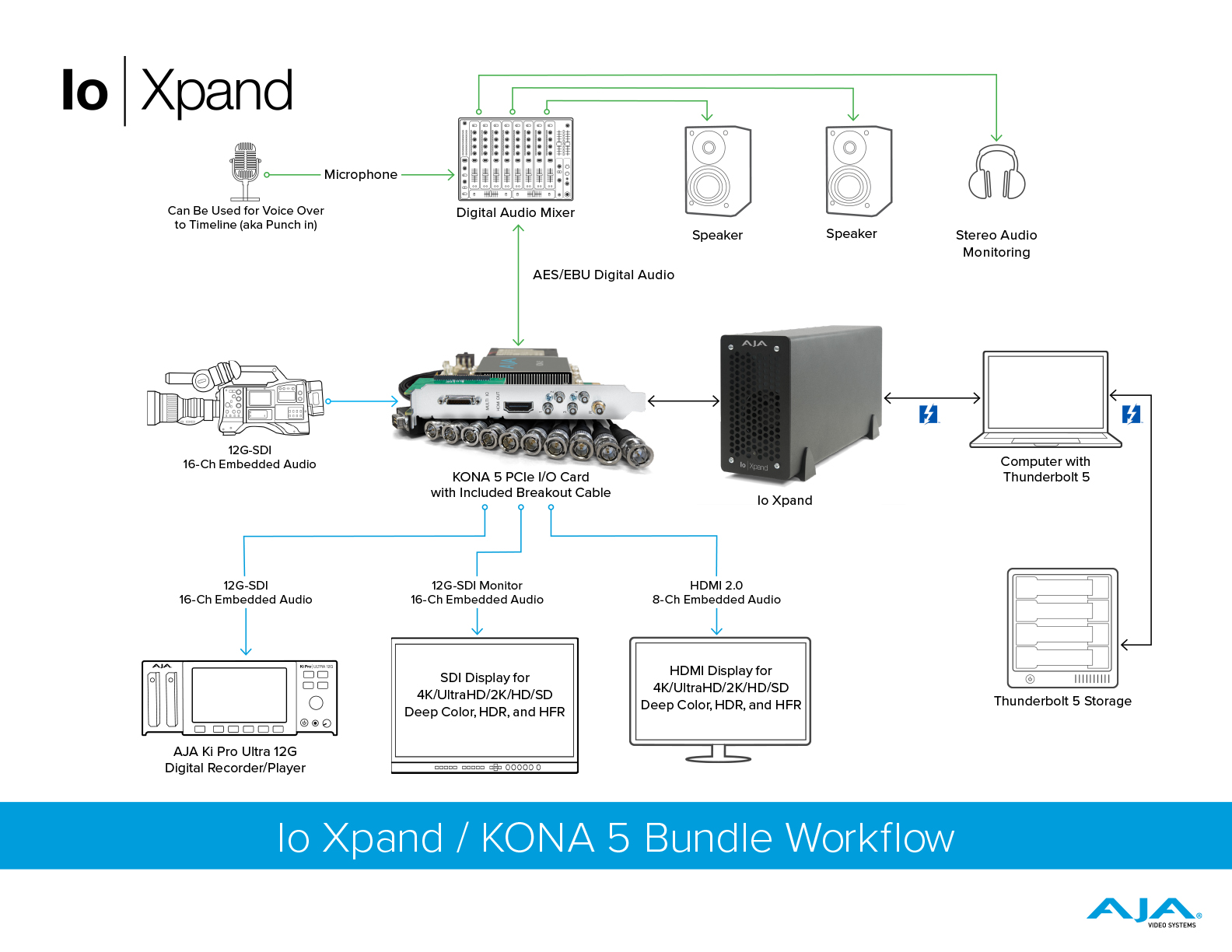

The useful distinction is 12G SDI over a fast host link
KONA 5 has four bidirectional HD-BNC connectors supporting SDI rates through 12G, a reference/LTC connector and a full-size HDMI 2.0 monitor output. AJA's mode table lists 4K and Ultra HD through 60p. For a single-link 12G-SDI 4K input, AJA documents capture with simultaneous SDI monitoring. That makes the included card a reasonable choice for a facility that already routes 12G-SDI and needs an external PCIe host connection. It is not a claim that a single KONA connector captures four independent feeds at that rate: the card's 3G-SDI 4K modes instead reserve all four connections in one direction, and the 8K/UltraHD2 modes have separate firmware and host conditions.
The high-rate plan in this assessment is deliberately narrow: one SDI source, 4K60, AJA Control Room, and a Thunderbolt 5 host. AJA presents the enclosure as a Thunderbolt 5 PCIe solution with an x8 mechanical / x4 electrical slot and up to 6,000 MB/s bidirectional PCIe bandwidth. The accompanying manual cautions that Thunderbolt 3/4 paths are nearer 2,880 MB/s and that lower bandwidth can affect 12G work. The card's maximum on its own is therefore not a universal promise for this package across every computer, cable, storage device and application. The selected 4K60 route also does not assert 4K60 HDR recording; AJA's HDR support depends on the application and exact mode.
OBS and Control Room are separate claims
AJA's OBS Quick Start Guide v17.1 includes KONA 5 and Windows/macOS workflows, so this review assigns a conservative single-source 1080p60 OBS plan. It does not infer that OBS inherits the card's 4K60 Control Room configuration, and the guide does not make KONA 5's 8K firmware mode an OBS path. If OBS is essential, choose the documented HD workflow first and confirm the currently supported driver and plugin against the exact OS. For the 4K60 target, use the AJA Control Room path and verify the KONA firmware personality, link routing, storage throughput and software release with AJA's current documentation before a production job.
Both Windows 11 and Mac paths are documented for the enclosure, but the host requirements are not identical. AJA lists Thunderbolt 5/4 or USB4/USB4 V2 on Windows 11; for Mac, it lists M-series systems or Intel Macs with Thunderbolt 3 and macOS 15 or later. AJA Desktop Software v18 is Apple-silicon-only on Mac, so an Intel Mac needs the supported v17.6 software branch. This review only asserts one conservative 1080p60 OBS setup on Thunderbolt 3 for an Intel Mac and a 4K60 Control Room setup on a Thunderbolt 5 host. The questionnaire's Thunderbolt choice cannot distinguish those generations, so the public result is a broad match, not a guarantee that the visitor owns TB5.
Check the package and the signal path before buying
AJA's manual identifies IO-XPAND-02 as the enclosure plus KONA 5 card and card cables; the package also has its power supply and Thunderbolt cable. The separate IO-XPAND-01 is enclosure-only, so a listing that says only “Io Xpand” is not enough to identify what is included. Match the actual IO-XPAND-02 ordering code, confirm the card and breakout/cables, then check that the source is SDI and the needed cable/adapters fit the card's HD-BNC connectors. The external enclosure does not turn HDMI into an input, provide HDCP bypass, or make an ordinary USB-C port equivalent to Thunderbolt.
KONA 5 is the strongest choice of these three Io Xpand bundles when one high-bandwidth 12G-SDI path is the central requirement. Its tradeoffs are a professional SDI signal chain, a firmware- and software-dependent setup, and the need to check the host-generation limit rather than shopping by connector shape alone. The KONA 4 bundle may be a better fit for 4K60 when the facility already uses its card-specific multi-link SDI mode; KONA 1 is the simpler HD/3G-SDI option. None replaces a consumer HDMI capture/pass-through device.
This is a source-based assessment, not a hands-on test. It makes no claim about measured capture performance, current stock, price, retailer bundle contents or seller condition. Primary references: AJA's Io Xpand product page and Io Xpand manual v1.0; the KONA 5 product page and KONA 5 specification sheet; AJA's KONA Series Manual v18 and OBS Quick Start Guide v17.1.
Key specifications
Key details at a glance
| Signal input | Four bidirectional 12G/6G/3G/1.5G-SDI HD-BNC connectors on the included KONA 5; use matching HD-BNC adapters for full-size BNC cabling. |
|---|---|
| Confirmed capture formats | Single-link 12G-SDI supports 4K/UltraHD through 60p; 3G-SDI 4K needs all four links in one direction; 8K requires distinct multi-link/firmware and host conditions. The authored 4K60 plan is limited to Thunderbolt 5 with AJA Control Room. |
| Confirmed passthrough formats | AJA documents simultaneous monitoring for 4K/UltraHD capture over 12G-SDI; this is a professional SDI monitor route, not HDMI console passthrough. |
| Computer connection | External thunderbolt 5 pcie expansion chassis containing an 8-lane pcie 3.0 kona 5 card; the bundle is not an internal pcie-only desktop card. |
| Named compatible software | AJA Control Room (AJA Desktop Software; version and OS requirements apply) / OBS Studio (AJA OBS Quick Start Guide v17.1; no 4K60 OBS or 8K OBS plan assigned) |
| HDR recording | Kona 5 supports hdr signaling and hdr workflows, but the exact application/rate combination is not established here as 4k60 hdr recording; no hdr capture matcher mode is assigned. |
Use the exact model’s instructions for operating limits, supplied equipment and version differences.
Sources for this review
Sources for this assessment
- AJA Io Xpand exact product page, current bundle identities, Thunderbolt/PCIe compatibility and operating system notes
- AJA KONA 5 exact product page and current support/software information
- AJA KONA 5 product-specific technical specification sheet
- AJA KONA Series Manual v18, KONA 5, KONA 4 and KONA 1 installation, firmware and format guidance
- AJA and OBS Quick Start Guide v17.1, PCIe device support, mode and OS summary
- AJA Io Xpand Thunderbolt Chassis Manual v1.0, IO-XPAND-02 package and host bandwidth
- Official AJA Io Xpand / KONA 5 bundle workflow image from the exact Io Xpand product page
- Official exact AJA KONA 5 PCIe card and breakout-cable image from the model page


Check your complete signal path
Choose the source format, desired captured signal, passthrough target, computer connection and software together. A single device must support that whole arrangement.