
Your needs, this model
Does it fit your priorities?
Does Corvid 1 capture 1080p60?
No. AJA’s exact Corvid 1 table tops out at 1080p30; the 720p entries extend to 60, but that is a different raster. Do not treat the Corvid 3G’s faster HD table as a Corvid 1 feature.
Explore this need in the finder →Can I connect an HDMI console directly?
No direct HDMI input is listed. The board accepts SDI; an HDMI source needs a compatible conversion stage, and that converter is separate from the card.
Explore this need in the finder →Which configuration should I check in a used listing?
AJA’s EOL notice names short and tall Corvid 1 configurations under Z-OEM-CRV-S-R0 and Z-OEM-CRV-T-R0. Verify the exact board/bracket and a compatible PCIe chassis before considering an offer.
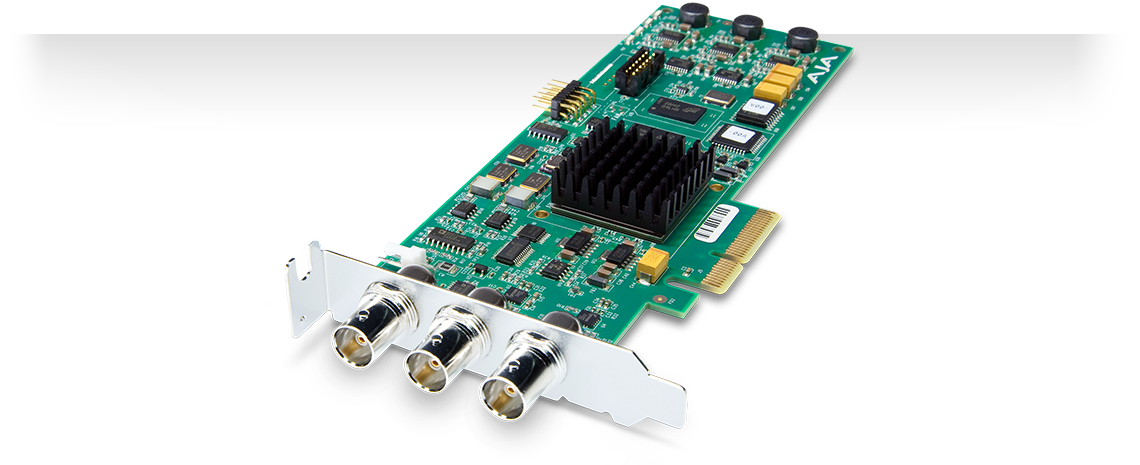
Explore this need in the finder →The original AJA Corvid is identified in the current NTV2 device reference as Corvid 1, sometimes simply “Corvid.” It is a legacy OEM PCIe video I/O board, not a USB capture dongle and not a modern HDMI gaming capture device. Its most defensible role is maintaining a documented SDI ingest/playout workflow or assessing an already-installed system. AJA marked the Corvid generation end-of-life in 2018 and named KONA 1 as its successor; that historical replacement statement is not a claim about present stock or compatibility.
One SDI input, one SDI output
AJA documents a single SDI input and output with reference, LTC and RS-422 connections. The board handles 8- or 10-bit video, up to 720p60 and 1080p30. The separate spec sheet lists SD and HD timings, and describes SDI video/audio input and output. In practical shortlist terms, “1080p” in the model literature does not mean 1080p60: this exact card tops out at 1080p30. It also has no HDMI input, so an HDMI console, camera or computer source would need an appropriate conversion chain before it could reach the SDI connector. That conversion is a separate system decision, not a feature included with the board.
The output connector is useful for a professional playout or signal-chain design, but it should not be read as a consumer HDMI passthrough path. The public mode data establishes SDI I/O; it does not document a monitor-friendly loop-through arrangement for every capture setting. The board is not listed with an HDMI loop output, HDR, VRR or an exact OBS recording preset. RGB is not supported at the SDI connectors; an input/output color-space converter is specified only for the Corvid 3G, not this Corvid 1.
Host and old-software caveats
This is a four-lane, first-generation PCI Express board. That describes its electrical interface, not a guarantee that any modern PC or adapter will enumerate it. The AJA SDK reference records Mac OS support in an old SDK release and says the device became feature-complete in SDK 15.0. AJA’s 2018 notice also discusses continuing developer support around the 15.0.1 feature set. Those notes identify a historic software path, not a promise that current macOS, drivers, editing applications or a particular motherboard still support it. The matching arrangement in this library is therefore limited to an earlier Mac/PCIe reference where the old SDK requirements are independently checked; a direct OBS workflow is not asserted.
AJA’s end-of-life letter identifies two Corvid order codes, Z-OEM-CRV-S-R0 and Z-OEM-CRV-T-R0, for short and tall configurations. The physical fit is consequential: check which card/bracket edition is actually offered, whether it clears the target chassis, and whether a suitable PCIe slot is available. The letter says Corvid was superseded by KONA 1, but also distinguishes support and SDK caveats; compare the separate the KONA 1 successor only after checking its own exact host and feature table. The products are not silently treated as identical.
When it is a poor new-build choice
For a new streaming setup, the dated SDK path, single SDI channel, lack of HDMI and 1080p30 ceiling are substantial constraints. A full-height versus short-bracket mismatch or missing breakout hardware can turn an apparently cheap used board into an incomplete installation. AJA documentation is enough to identify the capability boundary, but not to verify the condition of a particular second-hand card, whether it has the correct bracket, or whether a seller includes cabling.
Before considering any listing, identify Corvid 1 rather than Corvid 3G, check the order code and physical bracket, confirm the exact PC/Mac PCIe slot and supported OS/SDK combination, and trace the source through SDI. Verify the intended capture application independently; the product’s SDK support does not by itself guarantee a plug-and-play recorder. The board remains a useful reference for legacy integrators who need its one-channel SD/HD capability, but most buyers should compare a current device whose exact input, software and frame-rate matrix matches their use.
Key specifications
Key details at a glance
| Signal input | 1 x HD-SDI/SDI input; 1 x SDI output; one reference and LTC connection; RS-422 machine control |
|---|---|
| Confirmed capture formats | SD 525i59.94, 625i50; HD 720p50/59.94/60, 1080i50/59.94/60, 1080p23.98/24/25/29.97/30 and listed PsF timings |
| Confirmed passthrough formats | |
| Computer connection | 4-lane gen 1 pcie; short- and tall-bracket oem codes exist. |
| Named compatible software | AJA NTV2 SDK/developer integration |
| HDR recording | No rate-specific hdr recording mode is documented; do not infer hdr from input, an hdbaset loop or hevc capability. |
Use the exact model’s instructions for operating limits, supplied equipment and version differences.
Sources for this review
Sources for this assessment

Check your complete signal path
Choose the source format, desired captured signal, passthrough target, computer connection and software together. A single device must support that whole arrangement.